
Health Integrations
Connect Fitbit, Google Fit, Oura Ring, Withings, Garmin, Apple Health, and Samsung Health to give Luna awareness of your health metrics, sleep, and fitness data.
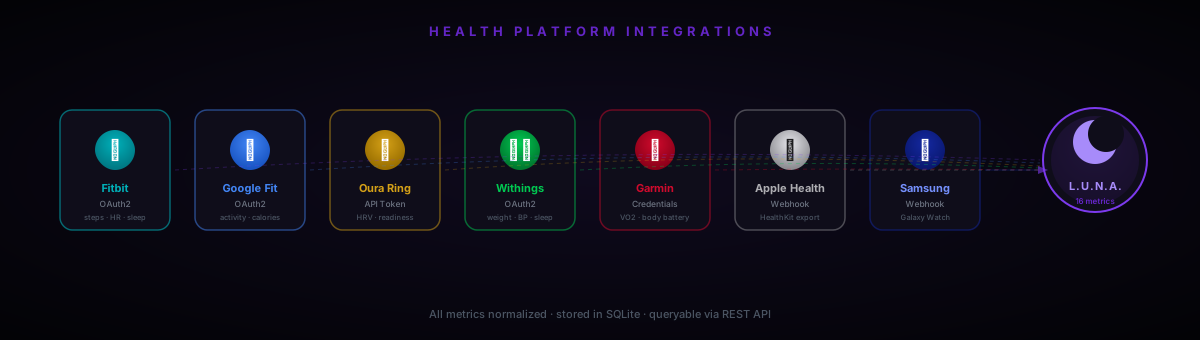
Luna can pull health and fitness data from 7 major platforms and 16 metric types. All data is stored locally in SQLite — nothing is sent to any cloud. You query it through chat or the REST API.
Platforms with a REST API (Fitbit, Google Fit, Oura, Withings, Garmin) sync on demand or on a schedule. Apple Health and Samsung Health — which have no public REST API — use a webhook receiver: a companion iOS or Android app pushes data to Luna.
No health credentials are required to run Luna. Every platform is independently opt-in. Data is stored in your local luna.db SQLite database and never leaves your machine.
Platforms
The most comprehensive health API. Covers steps, distance, calories, heart rate, HRV, all sleep stages, SpO2, breathing rate, skin temperature, and weight. Uses OAuth2 — create a free app at app.fitbit.com.
fitbit_client_id= · fitbit_client_secret= · then: GET /api/health/oauth/authorize/fitbit
Google's fitness aggregation platform. Supports activity (steps, distance, calories), heart rate, weight, body fat, SpO2, and sleep sessions from any Android wearable synced to Google Fit. Uses Google OAuth2 — create credentials in Google Cloud Console.
google_fit_client_id= · google_fit_client_secret= · then: GET /api/health/oauth/authorize/google_fit
Oura's v2 API gives richly detailed sleep stages, HRV, resting heart rate, respiratory rate, readiness scores, stress levels, and daily activity. Auth is a simple personal access token — no OAuth flow needed.
oura_api_key= — get it at cloud.ouraring.com/user/api-tokens
Specialises in medical-grade smart scales (weight, BMI, body fat), blood pressure monitors, and sleep mats. The best source for blood pressure and body composition data. Uses OAuth2.
withings_client_id= · withings_client_secret= · then: GET /api/health/oauth/authorize/withings
Detailed GPS workout data, Body Battery (readiness), stress tracking, VO2 Max, sleep stages, and SpO2. Uses the garth library to authenticate with Garmin Connect — requires your Garmin account credentials.
garmin_email= · garmin_password= — requires: pip install garth
iPhone and Apple Watch generate the richest per-minute health data of any consumer platform, but Apple provides no public REST API. Luna uses a webhook receiver — the free 'Health Auto Export' iOS app pushes data to Luna on a schedule.
Endpoint: POST /api/health/webhook/apple · See setup section below
Galaxy Watch and Galaxy Fit data through compatible Android exporter apps. Samsung Health has no public REST API, so Luna uses the same webhook approach as Apple Health — point a compatible exporter at /api/health/webhook/samsung.
Endpoint: POST /api/health/webhook/samsung · See setup section below
Supported Devices
Every device that syncs to one of the 7 integrated platforms is supported.
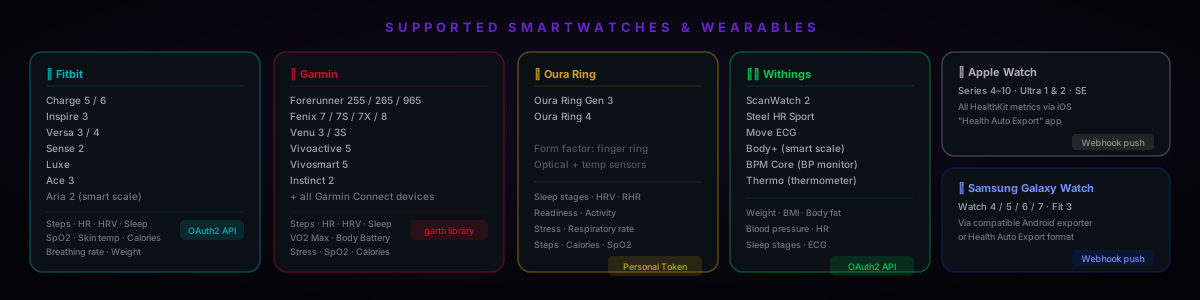
Google Fit aggregates data from many Android wearables — Pixel Watch 1/2/3, Sony Smartwatch, TicWatch, and any wearable running Wear OS. If your device syncs to Google Fit, set google_fit_client_id and it works automatically.
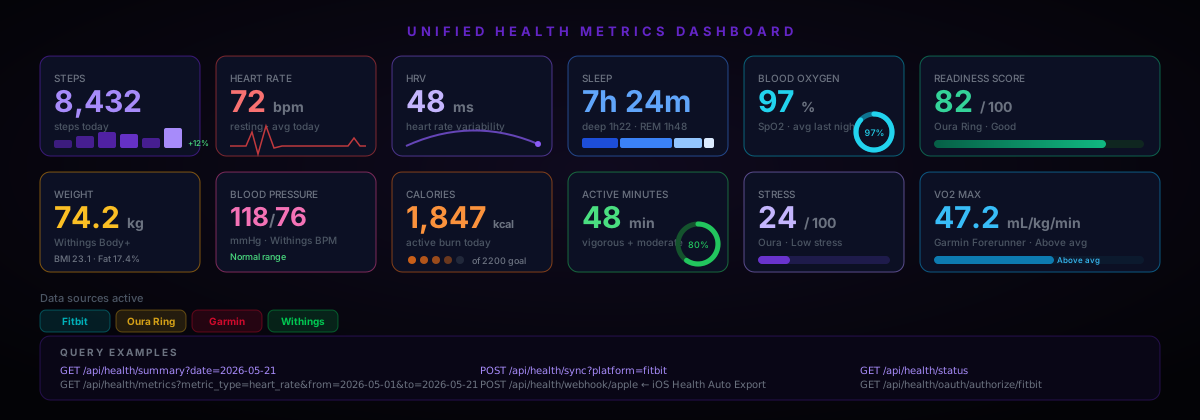
Metric Types
| metric_type | Unit | Platforms | Description |
|---|---|---|---|
steps | steps | Fitbit, Google Fit, Oura, Garmin, Apple, Samsung | Total step count for the day |
distance_km | km | Fitbit, Google Fit, Oura, Garmin, Apple, Samsung | Total distance walked / run |
calories | kcal | Fitbit, Google Fit, Oura, Garmin, Apple, Samsung | Active calorie burn |
heart_rate | bpm | All (intra-day avg) | Average heart rate |
resting_heart_rate | bpm | Fitbit, Oura, Garmin | Daily resting heart rate |
hrv | ms | Fitbit, Oura, Garmin | Heart rate variability (RMSSD / SDNN) |
sleep_duration_min | min | All | Total sleep duration |
sleep_deep_min | min | Fitbit, Oura, Garmin | Deep (N3) sleep minutes |
sleep_rem_min | min | Fitbit, Oura, Garmin | REM sleep minutes |
sleep_light_min | min | Fitbit, Oura, Garmin | Light (N1+N2) sleep minutes |
sleep_score | score | Oura, Withings | Overall sleep quality score |
blood_oxygen_pct | % | Fitbit, Oura, Garmin, Apple | SpO2 / blood oxygen saturation |
weight_kg | kg | Fitbit, Withings | Body weight |
bmi | kg/m² | Fitbit, Withings | Body mass index |
body_fat_pct | % | Google Fit, Withings | Body fat percentage |
blood_pressure_systolic | mmHg | Withings | Systolic blood pressure |
blood_pressure_diastolic | mmHg | Withings | Diastolic blood pressure |
stress_score | score | Oura, Garmin | Stress level score |
readiness_score | score | Oura, Garmin | Daily readiness / recovery |
vo2_max | mL/kg/min | Garmin, Apple | Cardiorespiratory fitness estimate |
respiratory_rate | rpm | Fitbit, Oura | Breathing rate |
skin_temp_c | °C | Fitbit | Skin temperature (nightly relative) |
active_minutes | min | All | Vigorous + moderate active minutes |
Setup Guide
Fitbit
- Go to app.fitbit.com/oauth2/applications and create a new app
- Set OAuth 2.0 Application Type to Personal
- Set Redirect URL to
http://localhost:8899/api/health/oauth/callback - Copy the Client ID and Client Secret to
.env - Open:
http://localhost:8899/api/health/oauth/authorize/fitbit - Authorise → copy the returned tokens to
.env
fitbit_client_id=23ABC4
fitbit_client_secret=abc123...
fitbit_access_token=eyJ...   # returned by the OAuth callback
fitbit_refresh_token=abc...  # returned by the OAuth callback
Google Fit
- Open Google Cloud Console → APIs & Services → Enable Fitness API
- Credentials → Create OAuth client ID → Application type: Web application
- Add redirect URI:
http://localhost:8899/api/health/oauth/callback - Add credentials to
.env, then visit the authorize URL
google_fit_client_id=123456...apps.googleusercontent.com
google_fit_client_secret=GOCSPX-...
google_fit_access_token=ya29...    # returned by callback
google_fit_refresh_token=1//...    # returned by callback
Oura Ring
- Log in at cloud.ouraring.com → User Settings → Personal Access Tokens
- Create a token and paste it into
.env
oura_api_key=YOUR_PERSONAL_TOKENWithings
- Go to developer.withings.com → Create an app
- Set redirect URI to
http://localhost:8899/api/health/oauth/callback - Add credentials to
.env, then visit the authorize URL
withings_client_id=abc123
withings_client_secret=def456
withings_access_token=...   # returned by callback
withings_refresh_token=...  # returned by callback
Garmin
- Install the garth library:
pip install garth - Add your Garmin account email and password to
.env
garmin_email=you@email.com
garmin_password=your-garmin-passwordOnce configured, ask Luna to sync: "sync my health data from Fitbit" or use the API directly: POST /api/health/sync?platform=fitbit
Webhooks — Apple Health & Samsung Health
Apple HealthKit and Samsung Health are closed ecosystems with no public REST API. Luna receives data via HTTP push from a companion app running on your phone.
Apple Health — Health Auto Export (iOS, free)
- Install Health Auto Export from the App Store (free tier is sufficient)
- Open the app → Automations → Add → REST API
- Set URL to
https://YOUR_HOST/api/health/webhook/apple - Add header:
X-Health-Secret: <your health_webhook_secret> - Choose metrics to export and set an export interval (e.g. hourly)
- Set
health_webhook_secretin Luna's.envto the same value
health_webhook_secret=some-long-random-stringYour iPhone needs to reach Luna's server. On a home network, set host=0.0.0.0 in .env and use your machine's LAN IP (e.g. http://192.168.1.10:8899/api/health/webhook/apple). For remote access, use luna tunnel or expose via a reverse proxy.
Samsung Health
- Install a compatible Android health exporter app (e.g. Health Export for Samsung)
- Configure it to POST to
https://YOUR_HOST/api/health/webhook/samsung - Add header:
X-Health-Secret: <your health_webhook_secret> - Alternatively, if your app supports Health Auto Export format, it works with the Samsung endpoint too
Webhook payload format
Both endpoints accept the Health Auto Export JSON format natively:
{
  "data": {
    "metrics": [
      {
        "name": "heart_rate",
        "units": "bpm",
        "data": [
          { "date": "2026-05-21T08:32:00+00:00", "qty": 68 },
          { "date": "2026-05-21T09:15:00+00:00", "qty": 72 }
        ]
      },
      {
        "name": "step_count",
        "units": "count",
        "data": [
          { "date": "2026-05-21", "qty": 8432 }
        ]
      }
    ]
  }
}
API Reference
| Endpoint | Method | Description |
|---|---|---|
/api/health/status | GET | All platform statuses and last sync timestamps |
/api/health/metrics | GET | Query stored metrics — filter by platform, type, date range |
/api/health/summary | GET | Daily cross-platform summary (defaults to today) |
/api/health/sync | POST | Trigger sync — ?platform=fitbit or omit for all |
/api/health/oauth/authorize/{platform} | GET | Start OAuth2 flow (fitbit / google_fit / withings) |
/api/health/oauth/callback | GET | Completes OAuth2, returns tokens to add to .env |
/api/health/webhook/apple | POST | Apple Health inbound push (Health Auto Export format) |
/api/health/webhook/samsung | POST | Samsung Health inbound push |
/api/health/metric-types | GET | List all supported metric type names and units |
Query examples
# All platform statuses
curl http://localhost:8899/api/health/status

# Today's cross-platform summary
curl http://localhost:8899/api/health/summary

# Last 30 days of heart rate from Fitbit
curl "http://localhost:8899/api/health/metrics?platform=fitbit&metric_type=heart_rate&from=2026-04-21&to=2026-05-21"

# Trigger sync for all configured platforms
curl -X POST http://localhost:8899/api/health/sync

# Sync only Oura
curl -X POST "http://localhost:8899/api/health/sync?platform=oura"

# Sync yesterday's data
curl -X POST "http://localhost:8899/api/health/sync?platform=fitbit&date=2026-05-20"

# Start Fitbit OAuth (open in browser)
open http://localhost:8899/api/health/oauth/authorize/fitbit{
"date": "2026-05-21",
"metrics": {
"steps": [{ "platform": "fitbit", "value": 8432, "unit": "steps" }],
"heart_rate": [{ "platform": "fitbit", "value": 72, "unit": "bpm" },
{ "platform": "oura", "value": 69, "unit": "bpm" }],
"hrv": [{ "platform": "oura", "value": 48, "unit": "ms" }],
"sleep_duration_min":[{ "platform": "fitbit", "value": 444, "unit": "min" }],
"sleep_deep_min": [{ "platform": "fitbit", "value": 82, "unit": "min" }],
"readiness_score": [{ "platform": "oura", "value": 82, "unit": "score" }],
"weight_kg": [{ "platform": "withings","value": 74.2, "unit": "kg" }]
}
}Asking Luna About Your Health
Once synced, health data is available to the LLM as context. Luna can answer questions, spot trends, and give personalised suggestions based on your actual data.
"How was my sleep last night?"
→ You slept 7h 24m with 82 min deep and 1h 48m REM. HRV was 48ms — solid recovery.

"How many steps did I take this week?"
→ Your 7-day average is 9,241 steps. Best day was Thursday at 12,800.

"Is my heart rate normal?"
→ Resting HR today is 62bpm, down from your 30-day average of 68. That's a positive trend.

"How's my readiness today?"
→ Oura scores your readiness at 82/100. Your HRV is above your average and sleep debt is low.

"Sync my Fitbit and tell me how my recovery looks"
→ (syncs Fitbit, then answers based on fresh data)

"Show me my blood pressure readings from the past week"
→ (queries Withings data, summarizes the trend)

"How does my sleep compare to last month?"
→ (queries last 30 days, computes averages, compares)

"I went for a run today — did my heart rate zones look right?"
→ (reads Garmin workout data if synced)Set up a daily cron or scheduler to auto-sync. POST /api/health/sync from a task scheduler (Windows Task Scheduler, cron, or Luna's built-in scheduler) each morning to have overnight sleep and yesterday's activity ready when you wake up.