
Architecture
How the Electron shell, React frontend, and FastAPI backend fit together — and how a message flows from input to streamed response.
Overview
Luna is built from three cooperating layers that communicate over HTTP and SSE. All three can run on a single machine; only the Electron shell requires a native OS environment.
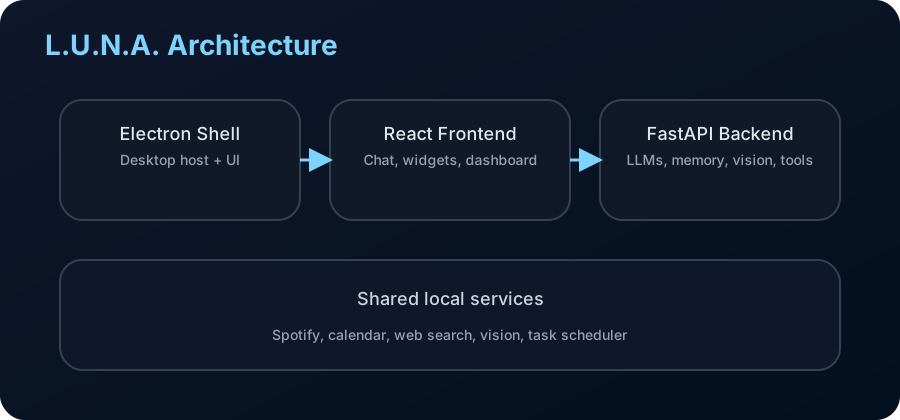
Three layers
Electron shell
electron/main.js is the desktop process owner. It starts the FastAPI backend as a child process, manages the health-check loop (exponential backoff restart on crash), creates the browser window, and wires up tray and IPC. The preload script (electron/preload.js) exposes electronAPI.apiBase and electronAPI.isElectron to the renderer without leaking Node.js APIs.
React / Vite frontend
frontend/src/App.tsx is the root. The app renders in one of three view modes —dev (sidebar + content), user (voice-focused), and luna(full-screen HUD). State is managed by a single Zustand store at frontend/src/store/index.ts. Feature components live in frontend/src/components/ grouped by domain.
FastAPI backend
backend/main.py bootstraps the FastAPI app, registers CORS middleware, mounts all routers, and starts background processes. Routers in backend/routers/ are intentionally thin — they validate requests and delegate all logic to backend/services/.
Message lifecycle
Here is what happens from the moment you send a message to the moment the response is complete:
- User input — text typed in
InputBar, voice processed by the voice route, or a scheduled proactive trigger fires. - Fast-path check — the backend checks a small set of intent patterns that should not hit the LLM (e.g. explicit app-launch commands).
- Context assembly —
memory_manager.pyfetches relevant facts from ChromaDB using semantic search, then appends personality state, recent calendar tasks, active activities, vision observations, and the last N conversation turns. - LLM call — the assembled prompt is sent to the configured provider (Ollama or OpenAI-compatible) with
num_ctx: 8192andnum_predict: 1024. The response streams as tokens. - Stream parsing — as tokens arrive, the backend scans for bracket commands (
[WIDGET:...],[WEB_SEARCH:...],[MAP:...]) and JSON tool calls. Commands are stripped from the displayed text and emitted as separate SSE events. - Tool execution — detected tools run concurrently where possible. Results (search snippets, Spotify state, widget data) may be appended to the stream as additional content.
- Memory update — after the
doneevent, background coroutines extract new facts, update personality scores, and compact long conversations into summaries.
SSE event protocol
The chat stream endpoint is POST /api/chat/stream. It returns text/event-stream. Each event has a type field:
| Type | Payload | Description |
|---|---|---|
metadata | conversationId, model | First event — identifies the conversation and model being used. |
token | content: string | A streamed text chunk from the LLM. Append to the current message bubble. |
command | action, payload | A parsed tool call — widget open, web search result, map display, Spotify action, 3D scene, etc. |
confirmation | tool, description, id | Luna wants to execute a tool but needs user approval first (confirm-mode tool). |
done | conversationId | Stream complete. Memory extraction runs after this event. |
error | message | Unrecoverable stream error. The frontend shows an error state. |
frontend/src/api/chat.ts wraps the SSE connection. The Zustand store dispatches each event type to the correct reducer — tokens go to streamMessage, commands open widgets via setDynamicWidget, and confirmation events set pendingConfirmation.
Tool execution model
Luna supports two command syntaxes that can appear in LLM output:
Bracket tags
Simple inline commands parsed from the token stream by regex:
[WEB_SEARCH:query here]
[WIDGET:{"type":"steps","data":[...]}]
[MAP:{"lat":40.7,"lon":-74.0}]
[SPOTIFY:{"action":"play","query":"artist name"}]
[SCENE:{"prompt":"rotating cube"}]
JSON tool calls
Structured tool calls in the model's native tool-use format. These go through tool_registry.pywhere each tool is registered with a name, schema, and permission mode.
Permission modes
Every tool has one of three permission modes set per user in data/permissions.json:
| Mode | Behaviour |
|---|---|
allow | Executes immediately without prompting the user. |
confirm | Emits a confirmation SSE event. The tool waits until the user approves or rejects via the UI banner. |
block | The tool call is silently dropped and Luna is told the tool is unavailable. |
Memory architecture
Luna's memory system has three tiers:
Structured facts — SQLite
Explicit facts about you ("user prefers dark mode", "user's dog is named Max") are stored as rows in the Fact table in data/luna.db. Each fact has a source (conversation ID), confidence score, and creation timestamp.
Semantic search — ChromaDB
All facts are also embedded with nomic-embed-text via Ollama and stored indata/chroma/. When assembling context for a new message, the backend runs a semantic search against the user's query to surface the most relevant facts — not just the most recent ones.
Personality engine
backend/services/personality.py maintains a floating-point state vector with dimensions for mood, energy level, formality preference, humor level, and emotional support need. These values drift based on conversation sentiment and update Luna's system-prompt tone in real time.
All memory is stored locally. Nothing is sent to external servers. The ChromaDB collection and SQLite database live in data/ and are gitignored.
Background processes
The backend registers long-running coroutines via backend/processes/registry.py. Each process runs on its own schedule:
| Process | Schedule | Responsibility |
|---|---|---|
memory_maintenance | Every 5 min | Extracts facts from recent conversations, compacts long threads into summaries, prunes low-confidence facts. |
proactive_followups | Every 20 s | Checks whether Luna should send an unsolicited message (reminders, observations, check-ins) and emits it to the frontend. |
calendar_reminders | Every 60 s | Scans upcoming tasks and calendar events and fires reminder notifications. |
voice_runtime | Continuous | Runs the wake-word detection loop and pipes audio to the STT model. |
List all registered processes at runtime:
npm run luna -- processesContribution boundaries
Keep changes scoped to one layer when possible. Crossing layers in a single PR makes review harder:
| What you're changing | Where it lives |
|---|---|
| API endpoint logic | backend/services/ — not in routers |
| New background job | backend/processes/ — registered in registry.py |
| UI component or view | frontend/src/components/<Feature>/ |
| Global client state | frontend/src/store/index.ts |
| Desktop/native behaviour | electron/main.js or electron/preload.js |
| New tool or skill | backend/services/tool_registry.py + skills/ |