
Benchmarks — Luna
Comprehensive Luna benchmark suite: 8 suites measuring inference speed, memory retrieval, tool routing accuracy, voice latency, instruction quality, and system resources — before and after the Luna engine.
Benchmarks
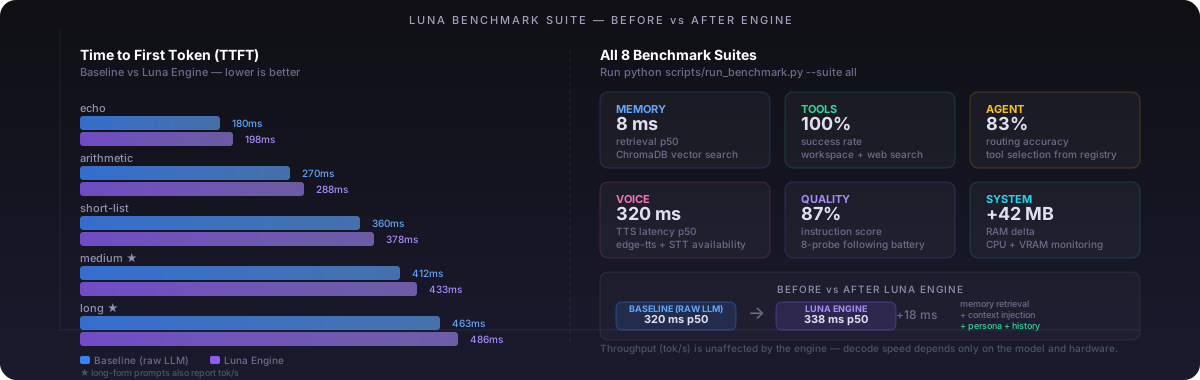
Luna's benchmark suite measures eight dimensions of AI engine performance — from raw inference speed to instruction quality to hardware footprint. The key output is a Before vs After Luna Engine comparison that shows exactly what the pipeline costs in latency and what it buys in contextual quality.
Overview
Most AI benchmarks only measure tok/s and TTFT. Real AI engine deployments care about much more: how fast memory surfaces relevant context, whether the agent picks the right tool, whether the model follows precise instructions, and what the RAM footprint looks like on a shared server.
Luna's benchmark runner measures all of this in a single command, saves results to the database for trend tracking, and emits a regression warning when any metric worsens by more than 25%.
Before vs After Luna Engine
The most important benchmark dimension is the cost/benefit of Luna's pipeline. Every call goes through two measurable phases:
- Baseline (raw LLM) — direct provider API call with no system prompt and no memory lookup. This is the theoretical speed ceiling.
- Luna Engine — the same call after ChromaDB retrieval + context injection + system prompt construction. This is what users actually experience.
| Metric | Raw LLM (Baseline) | Luna Engine | Delta | Notes |
|---|---|---|---|---|
| TTFT p50 | provider speed | base + retrieval | +5–30 ms | ChromaDB lookup cost |
| TTFT p95 | provider speed | base + retrieval | +10–50 ms | worst-case retrieval |
| Sustained tok/s | model max | model max | ≈ 0 | decode is unaffected by context |
| Memory retrieval | — | measured separately | counted in overhead | ChromaDB vector search |
| Context quality | plain prompt | memory-augmented | ✓ improved | user history injected |
| Tool access | — | full registry | ✓ enabled | requires engine |
| Persona | none | L.U.N.A. identity | ✓ consistent | system prompt injection |
Benchmark Suites
Eight suites, each targeting a different layer of the AI engine stack:
Direct call to the configured LLM provider with no system prompt, no memory, and no Luna pipeline overhead. This is the theoretical maximum speed — the raw inference floor for your hardware and model. Every other suite adds on top of this.
Full Luna pipeline: ChromaDB memory retrieval → system prompt construction with user context → LLM call. Compares directly against baseline. The delta shows what the engine costs in latency, and what it buys in contextual quality.
Runs 6 semantic probe queries against the ChromaDB vector store. Measures how fast relevant facts surface, whether the right category is returned, and whether the memory system degrades as the fact database grows. Hit-rate metrics require at least 10 stored facts.
Executes a set of safe, read-only tools (workspace list, web search) multiple times and measures success rate and latency. Only tools that cannot modify state are run — destructive operations are excluded from automated benchmarks.
Presents the LLM with 6 user requests and asks it to select the correct tool from the real TOOL_REGISTRY. Accuracy measures how reliably the model picks the right tool on the first attempt. Planning latency is the time to produce a valid JSON tool selection.
Measures text-to-speech generation latency via edge-tts across 4 sample sentences of varying length. Also checks whether a speech-to-text engine (vosk or faster-whisper) is installed. Full STT benchmarking requires a live microphone and is run separately.
8-probe battery testing whether the model follows precise instructions: exact word counts, structured output formats, persona identity, basic factuality, negation constraints, JSON schemas, and whether it retains information from earlier in the same prompt.
Uses psutil to sample RAM and CPU every 250 ms while running a long-form inference task. On NVIDIA systems, also queries VRAM via nvidia-smi. The delta columns show exactly how much resource Luna consumes during active generation versus when idle — critical for sizing self-hosted deployments.
Running Benchmarks
Full suite (all 8 benchmarks)
python scripts/run_benchmark.pyBefore vs after comparison only
python scripts/run_benchmark.py --suite baseline,engineSpecific suites
python scripts/run_benchmark.py --suite quality,agent,voice
python scripts/run_benchmark.py --suite system --runs 2
More statistical stability (more runs)
python scripts/run_benchmark.py --runs 5        # 5 warm runs per probe
python scripts/run_benchmark.py --suite llm --runs 10
JSON output for dashboards
python scripts/run_benchmark.py --json results/bench.jsonResults are automatically saved to the benchmark_results table and can be queried via GET /api/observe/benchmark.
Provider Comparison
Run the same suite with different providers using --provider to compare raw speed. The baseline suite is the cleanest way to compare providers because it strips all Luna overhead.
# Baseline: Ollama local
python scripts/run_benchmark.py --suite baseline --provider ollama

# Compare: Groq cloud (~300 tok/s)
python scripts/run_benchmark.py --suite baseline --provider groq \
  --model llama-3.3-70b-versatile

# Compare: Anthropic
python scripts/run_benchmark.py --suite baseline --provider anthropic \
  --model claude-sonnet-4-5

# Compare: Google Gemini
python scripts/run_benchmark.py --suite baseline --provider google \
--model gemini-2.0-flash| Provider | TTFT (typical) | tok/s (typical) | Quality | Notes |
|---|---|---|---|---|
| Ollama (local) | 300–600 ms | 20–80 | ★★★★ | depends on GPU/model size |
| Groq | 100–300 ms | 200–300 | ★★★★★ | ~300 tok/s cloud inference |
| Anthropic | 200–500 ms | 100–200 | ★★★★★ | Claude models, SOTA quality |
| Google Gemini | 200–400 ms | 100–200 | ★★★★★ | multimodal, long context |
| OpenAI | 200–500 ms | 50–100 | ★★★★★ | GPT-4o and variants |
| Mistral | 200–400 ms | 100–200 | ★★★★ | fast EU-based inference |
| Cohere | 200–500 ms | 80–150 | ★★★★ | RAG-optimised Command-R |
Regression Detection
Every benchmark run is saved to the database. On subsequent runs, the runner compares the current results against the previous run and flags any metric that worsened by more than 25%.
# Regressions vs previous run
  [baseline] TTFT mean regressed +28%  (320.0 → 410.0)
  [quality]  quality score regressed -30%  (0.87 → 0.62)
Regressions appear at the top of the Markdown report and in the console summary. The threshold is configurable in scripts/run_benchmark.py via REGRESSION_THRESHOLD.
API Access
Benchmark history is accessible via the observability API:
# Latest result per suite
GET /api/observe/benchmark

# Suite history (last 20 runs)
GET /api/observe/benchmark?suite=baseline&limit=20

# Run a benchmark from the API (admin only)
POST /api/admin/benchmark/run
Authorization: Bearer <jwt_secret>
{ "suite": "baseline,engine", "runs": 3 }